
 You don’t have to be a tech wizard or a billion-dollar brand to rule the virtual roads we call the internet.
The great equalizer? Great SEO.
SEO, or search engine optimization, is the process of making your website more visible to search engines through organic methods. By “organic methods” we mean no paid advertising.
It’s a long game – but a manageable one, especially when you break it into simple, repeatable tasks. Whether you’re working with an agency or managing web content in-house, knowing what to focus on (and how often) makes all the difference.
Let’s do a drive-by of the core SEO tasks every B2B marketer should keep on their radar, from technical checkups to content strategy. And, yes, we’ll address the AI elephant in the room. (Hi, ChatGPT.)
SEO Tasks to Prioritize in 2026
To keep your site healthy and rankable, you’ve got to build and maintain an SEO superhighway of sorts. There are certain one-off and recurring SEO tasks that are non-negotiable if you want to outposition your rivals as a B2B:
- Set up Google Analytics & Search Console
- Research keywords
- Create (& refresh) content
- Links!
- Run a technical audit
- Polish your meta game
(We promise to keep the SEO terminology as simple as possible so you don’t get lost.)
1. Set up Google Analytics & Search Console
⏰ How Often: Once
These tools monitor how – and how well – users interact with your website. Analytics focuses on the "on-site" journey, whereas Search Console focuses on the "pre-click" data.
Both platforms are basics in the B2B SEO strategy.
Google Search Console
If you're serious about tracking your website’s performance, Google Search Console (GSC) is a great starting point. It’s a free, yet powerful diagnostic tool. This platform shows you which keywords bring in traffic and where your site might be underperforming due to performance and usability issues.
You don’t need to know how to code, but you do need to understand how your site is built, organized, and presented to users and search engines. Even a small time investment in learning Search Console can lead to smarter SEO decisions – and better search performance.
How to Set Up Google Search Console
- Go to search.google.com/search-console and sign in with a Google account.
- Tell Google which website is yours. You’ll be asked to enter your website address. If your site uses multiple versions (like with or without “www,” or both HTTP and HTTPS), Google gives you two options: Domain covers everything, including subdomains like blog.example.com), while URL Prefix covers just one version – like https://www.example.com. If you’re not sure which to pick, start with URL Prefix.
- Prove you own the site. The easiest way to verify this is via Google Analytics or Google Tag Manager if you already use one of them. Alternatively, you can upload a file to your site or add a small code snippet to your homepage as proof.
- Once verified, Google will begin collecting data, though it may take 1-2 days for reports to populate.
Did reading these instructions induce a panic attack? If you’re still not sure how to do this, just ask your web developer, IT team, or external marketing agency. It usually takes 5 minutes or less.
Google Analytics
Google Analytics (GA) complements Search Console by helping you understand what visitors do after they land on your site. It’ll help you measure metrics like bounce rate, average engagement time, conversions from organic search, and so on.
How to Set Up Google Analytics
- Go to analytics.google.com and sign in with your Google account.
- Click Start Measuring and follow the prompts to set up an Analytics account.
- Name your property – this is usually just your company name or website.
- Choose your time zone and currency, then click Next.
- Tell GA where your website traffic is coming from. Choose Web, then enter your website URL. Give your data stream a name (e.g. “Main Site”) and click Create Stream.
- Install the tracking code on your website. Google will give you a short snippet of code (called a “G-tag”) to paste into your website's <head> section. If you're using WordPress, HubSpot, or Google Tag Manager, there are easier ways to drop the tag in without manual coding.
(💡 p80 Tip: If you’re not responsible for managing the guts of the website, just send the tracking code to your developer. It only takes a minute to add.)
Once you install the tag, GA will begin tracking real-time and historical data about your site visitors. This includes where they came from, what pages they viewed, how long they stayed, and whether they took key actions like filling out a form!
2. Research Keywords
⏰ How Often: Every 3 months
Keywords are terms that people use to search for information on Google and other search engines. By adding the right keywords to your website’s copywriting, your pages can appear front and center before the eyes of your ideal customers.
Each page on your site should have its own primary keyword. This term should clearly match your page’s content or the problem it’s promising to solve. Sprinkle in related, secondary keywords on each page as well to reinforce to Google what the page is all about.
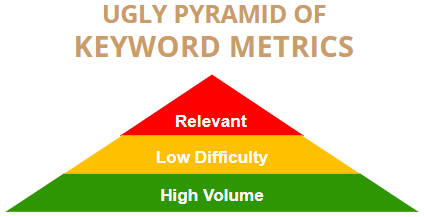
How do you choose keywords? It’s not as simple as spamming your product and company names on every page. As our poorly illustrated graphic above shows, there’s a hierarchy to keyword selection.
The main objective of an SEO campaign is to increase both the quantity and quality of the traffic and leads you’re generating. Thus, priority #1 is ensuring each keyword is relevant to the page it’s attached to – and that it mirrors what potential buyers are actually searching. After that, look for terms with low difficulty – especially if the page is hyper-specific (i.e. a blog post or product sub-sub-subpage). If the first two metrics are neck-and-neck, then you can spring for high volume – just don’t overvalue this metric if you’re a B2B with a niche product.
Sort out what you’ll be targeting before you write a single piece of content. Your targeted keywords help to give your content focus, and will serve as a guide for your writing. Content that’s clear and concise, yet comprehensive, tends to rank better on Google than content that jumps all over the place.
|
Be a Jerk. Peek at Your Rivals’ Keywords.If you’re struggling to start with keyword research, see what other companies like yours are doing. Check out the way they describe their products, services, and customer pain points – you might pick up a keyword or two you hadn’t thought of. You can even use keyword and SEO tools to do some legalized spying on your competitors. Simply pop a rival’s URL in the tool, and it’ll show you every keyword it ranks for in Google. |

3. Create & Refresh Content
⏰ How Often: Weekly
Creating fresh content is a core part of SEO. Yes, this applies to you – even if your product or service is “boring” or hyper-niche, there’s someone out there looking for it. After all, 70% of the B2B buyer’s journey happens online before ever contacting a salesperson.
|
Product/Service |
Should You Write About It? |
|
Gerotors? |
Yes |
|
Powder metal components? |
Yep |
|
IT mainframe services? |
Uh huh |
|
Transient absorption spectroscopy!? |
Affirmative |
We’ve successfully copywritten web content for every industry in the table above, so we’re not making this up.
Each new blog post, landing page, or resource you publish gives Google another opportunity to rank your site for relevant keywords. It also gives your audience another reason to engage and stick on your site longer.
The best SEO content revolves around your buyers’ real questions and your company’s subject-matter expertise. Don’t churn out fluff or AI slop – focus on value and your unique perspective. A single great article can outshine a dozen cookie-cutter ones.
What About the Refresh Part?
Way back at the 2017 INBOUND conference, we attended a session by a speaker from Vye Agency about their successful use of a concept they called ROPS – Rework, Optimize, Publish, Share.
ROPSing is the process of updating existing content with new information, and optimizing it to better align SEO and buyer expectations.
We started adding ROPS tasks to clients’ road maps – and our internal road maps – heading into 2018. We haven’t looked in the rearview mirror since.
Why? That’s simple:
- A marketer’s time is precious, and ROPSing is often faster than starting from scratch
- Data shows that well-maintained pages drive more traffic after year 1 than most pages do in months 0-12.
- A page with a 2025 publish date gains more trust from Google & humans than one last updated in 2019
(Related Resource: Manufacturing SEO for Dummies)
4. Links, Links, Links
⏰ How Often: As you publish new content
As the roads that connect people with information, links are a core part of SEO. These are two-way streets – both internal and outgoing links impact how users and search engines grasp your website.
Here are some link-errific SEO tasks to start with:
Add New Links to Existing Content
As you publish new blog posts or service pages, revisit older content and look for opportunities to link to these newer pages. This helps:
- Distribute authority across your site
- Guide visitors to next steps or related topics
- Signal to Google which pages are most important
Don’t just drop in a messy URL or link the words “Click Here.” Use keyword-relevant link text whenever possible.
Earn Backlinks
Backlinks are links from other sites that lead to yours. In essence, they signal to Google that your site is trustworthy and contains valuable information.
B2C marketers often go rabid in pursuing backlinks, but in B2B and niche industries, quality beats quantity.
Here are a few realistic ways to earn backlinks without being spammy:
- Collaborate with partners or vendors on content and ask for a link back
- Get listed in niche directories or trade association websites
- Pitch guest posts or thought leadership content to relevant industry publications
Don’t waste time buying links – that’s a fast track to a Google penalty. Focus on building helpful content and relationships in your space, and the backlinks shall cometh.
5. Run a Technical Audit
⏰ How Often: Every 3 months
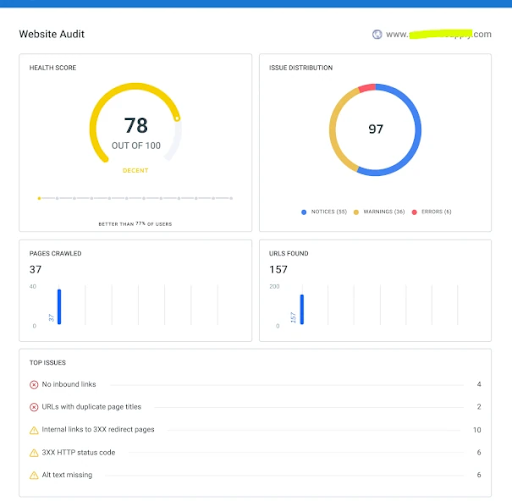
A technical SEO audit is a checkup that looks under the hood of your website to find issues that might prevent search engines from ranking your pages. It covers behind-the-scenes performance factors like site speed, broken links, mobile usability, and duplicate content.
A routine audit helps you catch issues early before they have SEO-rious side effects. (Sorry.). SEO performance often shifts subtly over time, so a quarterly audit keeps things on track without overloading your team.
A technical checkup should also be one of your immediate steps after launching a redesign, or any other major site changes. These changes can easily “break” site infrastructure in the back end.
Baseline Metrics We Recommend
Let’s say you’re a mid-sized B2B industrial company. Below are some key SEO metrics and their benchmarks – not hard rules, but something for you to aim for or compare against.
|
Metric |
Description |
Where Measured |
Benchmark |
|
Site Health |
Measures overall site health |
An SEO tool |
Top 10% of sites are at 92% or above |
|
Indexed Pages |
# of pages in Google's searchable database |
Google Search Console |
100-1,000+ (based on your size) |
|
Speed (Desktop) |
How fast content on your page loads on desktop |
Google Search Console |
85-90 |
|
Speed (Mobile) |
How fast page content loads on mobile |
Google Search Console |
85-90 |
|
Website Score |
Holistic measure of a site’s online presence |
HubSpot Marketing Grader |
85-90 |
|
Ranking Keywords |
# of terms site ranks for in top 100 Google results |
An SEO tool |
500-5,000+ total; 50-500 in top 10 |
|
Clicks |
Monthly # of visits from Google search results |
Google Search Console |
500-10,000+ (based on market, niche) |
Some tasks are best executed with a dedicated SEO tool such as SEMrush or SE Ranking. SEO platforms typically have free versions, but they’re pretty limiting (except for the smallest of business).
If your website has a lot of pages but clicks are low, your content may not be targeting the right keywords, buyer persona, or audience intent. If you have hundreds of ranking keywords, but few in the top 10, your content may need optimization or better linking support. Organic clicks should trend up over time – even modest growth shows your efforts are working.
An SEO Audit Should Include …
So, what are you actually doing for an SEO audit? Grab the right tools and hit up these potential sore spots:
🚀 Test page speed – Use tools like Google PageSpeed Insights to evaluate mobile and desktop performance, including key Core Web Vitals. Fix issues like huge image file sizes/dimensions or slow server response times.
🛠 Scan for site errors – Crawl your site with a tool like Screaming Frog or SEMrush to catch broken links, 404 errors, and other issues that damage SEO and user trust.
🔍 Improve crawlability & indexing – Use Search Console to see which pages are indexed. (Indexed = eligible to appear in Google Search.) Make sure your most important content is discoverable, and avoid duplicate or thin pages competing for the same search terms (aka keyword cannibalization).
📱 Review mobile usability – Google prioritizes the mobile version of websites by default when indexing them, so your site needs to work seamlessly on smartphones and tablets. Check for mobile-friendly font size, button spacing, and layout using GSC’s Mobile Usability report.
🧭 Check site structure & navigation – Your site should have a clear hierarchy and logical navigation. A well-organized structure helps search engines understand your content and guides users smoothly to the right topics and conversion paths.
6. Polish Your Meta Game
⏰ How often: Yearly (at least)
If you're a B2B with dozens (or hundreds) of website pages, it’s easy to overlook or duplicate metadata.
Metadata (aka SEO tags) plays a key role in how your pages appear in Google’s search results. Think of it as your content’s elevator pitch.
The two elements to focus on are:
- Title tags – These appear as the blue linked headline underlined in Google results. Aim for 50–60 characters (so Google doesn't cut it off), include relevant terms, and make sure each page’s title is unique. Your goals are twofold: Set clear expectations for what's inside, and entice readers to click.
- Meta descriptions – These blurbs appear just below the title tag and give users a preview of your content. While they don’t directly affect rankings, they can make or break a user’s decision to click. Keep them under 155 characters and write them like ad copy: clear, helpful, and action-oriented.
Anytime you update or repurpose a page, review and revise the tags as necessary. If a page’s focus, keywords, or target audience shift, your title tag and meta description should reflect that.
What About AI Search?
Loudmouthed influencers have been writing “SEO is dead!” articles for many years – long before AI chatbots became a thing. Now that ChatGPT and Google AI Overviews exist, those same silly claims are as loud as ever.
If you’re wondering whether optimizing for search engines is still worth it, the answer is yes. If you’re wondering whether optimizing for AI search is worth it, the answer is also yes.
The good news? By doing one, you’re basically doing the other.
Writing accurate, helpful content is how you rank well in traditional engines. What’s more, AI trains itself on expertly written pages. SEO makes your expertise visible to humans and supplies the data that AI engines draw from.
In summary: Do what we recommended above, and everything will take care of itself.
The Road to Good SEO Never Ends
There’s no single switch that makes SEO “done.” It’s an ongoing process of maintenance, refinement, and publishing. The root of it all is your level of understanding of your audience and how to communicate with search engines.
Whether you’re running quarterly audits, refreshing old blog posts, or just fixing a few broken links, the little things add up. And if you’re consistent, they pay off – not just in rankings, but also in leads and long-term trust with your buyers.
Those are the basics. To see a more nitty-gritty SEO checklist you can download and take with you, click below:

How to Audit your Online Marketing
If you are executing digital marketing, congratulations! You are most likely already one step ahead of your competition, and making strides to meaningfully connect with prospects online. But, how do you know if you’re seeing continual success year over year, and improving your metrics?
Without the tools in place to analyze and benchmark your efforts, it is impossible to scale your online marketing and ensure continuous success.