
Wouldn't it be glorious to live in a work world where everything is exactly where you need it, when you need it? No matter what internal team you're on, where you're located, or how big and sprawling your team is?
That's the idea behind Supered.io.
Supered is a digital adoption platform (DAP) whose mission is to make process and tool implementation easier on beleaguered teams. This can ease the pain of anything from HubSpot CRM implementation to process enforcement to new-hire training.
To uncover exactly how Supered can impact B2B teams, I sat down (virtually) with Vicki Sonne, HubSpot solutions developer at protocol 80. She’s an absolute RevOps whiz, and our resident subject matter expert in software and process onboarding.
Below are the highlights. If you instead want the full story, watch above or peep the Inbound Unbound podcast. You can listen on Spotify or wherever you get your podcasts!
Let's start with the basics. What is the Supered digital adoption tool? How does it solve CRM integration issues with HubSpot?
A: Supered was created to help improve process and platform adoption for any web-based application. In our day-to-day use cases, we're usually talking about how to better implement HubSpot, how to get teams to use HubSpot.
 The cool thing is it's not built just to work with HubSpot; it can work with any platform that is web-based. That could be Salesforce, or maybe an ERP system, Gmail, LinkedIn. The sky is the limit. It's unique in that it can work across different URLs and platforms.
As far as how it's implemented, it's run off a Chrome extension that Supered calls the Sidekick. Once you have the extension downloaded into your browser, you have this little lightning bolt icon that shows up on the right side of your screen, giving you access to all types of content or documentation built out in your Supered account.
Why do you think implementing new tools like CRMs or enablement platforms is so challenging for teams, especially in B2B and manufacturing?
A: Any big change can be time-consuming and overwhelming, but it's particularly hard with CRMs because that's your core tool and where all your information lives – your data, records, activities, everything your team has done, potentially all your reporting. All of that information is in one place and also spread across your teams. Platforms can look different; data structures can be different.
Data lives in different ways in HubSpot versus other platforms. There's just a lot of complexity around making that change and understanding what might be different when you move to HubSpot or use HubSpot.
Definitely. When there's a ton of different teams all using the same platform and data, it can lead to a lot of confusion. In your experience, what are the biggest barriers when introducing a new tool like HubSpot to traditional teams?
A: One of the main items is understanding the data structure. If you're coming from Salesforce and moving to HubSpot, understanding terminology differences is key – what might be a Salesforce lead or contact is going to be a contact in HubSpot, the differences of accounts versus companies, etc. Just really understanding what you have, how it's structured, and having a clear idea of what it's going to look like when you move into HubSpot so everyone is aligned.
Another thing is just knowing all the tools available. During onboarding, it's so overwhelming; you have all these things, but you don't really know how to use them or why you should use them. Understanding some of those core tools that can make your life easier – in marketing, sales, or service – streamlines your workflow and saves you time day to day.
I've seen a lot of that: getting HubSpot as a new tool and feeling decision paralysis – ‘Where do I start, what do I do, where do I click?’ I'm sure you see it a lot where clients have set things up, everyone's kind of all over the place, no synchronicity. You then have to untangle a lot of webs.
It's easy to get distracted by the bells and whistles, those really cool features. But at the end of the day, if you don't have a defined process and your team doesn't know what it is, that makes it hard to have a system that's used consistently.
Do you have any specific examples of a a client or internal team struggling to adopt HubSpot before having tools like Supered or pulling in the RevOps team?
A: Recently, we've been using Supered to help us establish a more standardized onboarding process. Onboarding can be complex and overwhelming, and sometimes you just don't know where to start. We used to treat every client as different, every process as different.
 What has made a big difference for us internally is using the Action Plan feature in Supered to lay out the full onboarding process. With Action Plans, you can have different phases and tasks within each phase. It's a great way to (solidify) a master road map. It takes away some paralysis.
Sometimes, when we say standardizing your process, people think it's a cookie-cutter experience – everything the same, no deviation – but that's not the case. The structure is there to help, to ensure we ask the right questions in discovery and understand all we should know for a good solution. It's not cookie-cutter; it's a starting point. We can always customize.
Everyone's goals are different, so we need to start with those intro questions to make sure we're all pulling in the same direction. I love a good process – it cuts down on misaligned expectations and keeps things moving smoothly and quickly.
Clients have come up with cool ideas for using Action Plans internally, like onboarding a new sales rep – creating an Action Plan for what they need to know, training to take, setup items. Some have used it in marketing, establishing campaign launch processes, with documented tasks assigned to team members. There are many ways this tool could be used within Supered.
From a RevOps perspective, what are the key steps in planning a successful CRM implementation?
A: Sometimes there are a lot of steps, but at a basic level, start with alignment on project goals. What are we trying to do with this implementation? How do you expect to use HubSpot? Making sure those expectations are outlined and documented, so everyone knows what we're trying to accomplish. After that, do a good discovery process – it might take more than one call – to make sure you understand processes, what's changing, or needs to be built from scratch.
Documentation is important. I love a good workbook or a piece of documentation with all the information in one place, for multiple teams to use to guide decisions and processes. Anything you can do to document your current state helps you decide whether to replicate, improve, or start something new in HubSpot.
We've seen success with (having) a beta group of users test things, especially for large teams or those in different regions. Select a few users from departments to beat up on a phase-one (version) and work out kinks, so full-team training and implementation run smoother.
After implementation, reporting is important. It's great if you can report on efforts to see what's working or what needs improving.
Then we move on to training: establishing a process or change management plan, setting expectations for using the system, fully implementing for a client. Usually, that's phase one. It's important to keep continuously reviewing and improving. That's the foundation, then (we) add new tools, use workflows to automate, and streamline after the foundation is set.
It's never completely done. There's always another tree about to fall down, always something needing attention, or new features to roll out. HubSpot is always growing and adding things to test and plan for.
Mmmhmm. Supered helps with outlining the structure of any project, particularly onboarding. It provides a high-level overview or road map of how to get from point A to point B, breaking it down into small pieces. You can assign tasks to people or roles, leave comments and mentions – accessible right in whatever tool you're using.
You've been a huge part of our efforts to build out Action Plans, discoveries, things like that. Can you walk us through your work and the aim there?
A: It's been a big project.
I’ve seen the spreadsheet, so I can confirm that.
We've tried to break down onboarding into smaller tasks and phases. For general HubSpot setup, we have a section in the Action plan Outlining tasks. But it's not just "Do this"; there's a "card." Clicking into a task shows you more about it – what it means, why it's important.
HubSpot has an immense knowledge base, which is helpful for "how-to" instructions. But sometimes you want to know "why should I do this?" or how it fits the bigger picture. We've included sections explaining the importance. For the "how-to," we rely heavily on HubSpot's knowledge base since they know it best. We're bringing resources and insights from years of using HubSpot into one place for clients, so they don't have to dig for it.
It's cutting down on client questions with quick fixes. I’ve sent countless videos and messages with one-off things like "how to add a user to social media posting privileges." This helps us impart knowledge directly in the portal. Your work has been so impactful already. HubSpot is such a huge investment – this helps everyone get more out of it.
Awesome; I appreciate that.
Any moments where it was clear a client finally ‘got’ the value of the HubSpot platform or Supered? I know it’s still being rolled out, but any client ‘aha!’ moments yet?
A: I’ve demoed Supered for a few clients, and every time I get to the Process Rules tool, they have a jaw-dropping reaction. For context, Process Rules in Supered can be similar to deal or those colored ticket tags in HubSpot, but go further. It’s a rule you set in Supered, and if the criteria is met, it can show warning or positive messages directly in the HubSpot record timeline.
For example, you could say, "If a contact or company are missing from a deal, show a message to the user." It's a great way to enforce rules, enable good data entry, have good reporting, and guide people to use the system the way you want.

The first time I heard about it, my jaw dropped too. So many clients have been in HubSpot forever, and multiple people come and go. It’s hard to keep the data consistency you need for good reporting. Many are doing data cleanups – having this kind of trigger would cut down on that because the reminders are automatic. There’s always room for human error, but much less of it.
That’s exactly it. Clean data is important for sales and marketing reporting, to know what’s moving the needle. Clean deal data would make me so happy – being able to pull from that and strategize would be great. I have high hopes for what this could do.
Some listeners might say, ‘That sounds great, but I'm trying to pare down my tech stack.’ Why should Supered be something they add?
A: That's valid, but Supered is powerful because it helps your team use the tech stack you already have better, faster, and more efficiently. It works on various platforms, bringing value by consolidating all documentation and guidance in one place rather than scattered in Google Drive and Docs. It's a productive way to cut down by moving everything to one spot.
If there’s a Google Doc buried in someone’s folder, it’s not as helpful as having guidance directly in the platform. This can help make all your investments more impactful. It might be adding one tool, but if it makes everything more impactful, it’s a no-brainer.
For someone planning a huge CRM implementation in the next 3-6 months, what should they do today to make it smoother and less intimidating?
A: If I could say one thing, it’d be to start documenting your processes. It doesn’t have to be elaborate or pretty. Just write it down: how you generate leads, your sales cycle, buyer’s journey, sales process, how people move through the funnel, how sales-to-service or marketing-to-sales handoffs work, client service or ticketing processes. Having that documented early makes implementation so much easier for whoever helps you – agency, consultant, or otherwise. It saves time and keeps the project moving.
Any low-hanging fruit to make a CRM more user-friendly, with or without Supered, for teams feeling lost or wanting more from their investment?
A: Customizing your records in HubSpot can have a big impact. Look at a contact or deal record: What’s in the left sidebar, in the center cards, what associations are on the right? Especially with multiple teams or lots of data, using logic to show certain properties based on record type, or showing info from associated records in the center, makes a huge impact. Less clicks saves a lot of time.
You can make record views available by team. If Marketing wants to see certain data points, (while) Sales wants others, set those up so the important information is easily accessible for that user or team. If all the info I want is there, there’s less frustration. A world without digging.
What’s your favorite capability in Supered?
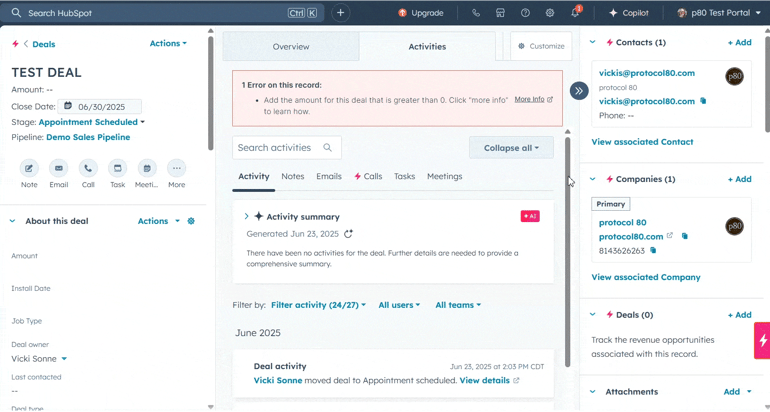 A: It might be a toss-up. I really like the Process Rules – an awesome way to enable your team to fill in the right information, take the right steps, and follow expectations. The project manager in me likes the Action Plans. We’ve used it for onboarding and internally, but there are so many potential use cases once clients understand how to use Action Plans and standardize processes. It could be a powerful tool.
Is Your Process Broken?
Does the following sound like your CRM system and practices? Or your team’s “approach” to process management?
- You spend hours painstakingly outlining processes, but the team can't find them (or doesn't look).
- You have great field sales meetings, but the notes never make it to the in-office team.
- You spend $10,000 a year on a fancy CRM, but nobody uses it consistently.
Yeah, that’s gotta stop. And software adoption solutions like Supered are the future of solving this issue.
Supered is still such a new tool, so I’m sure you have questions about it, or about CRM/HubSpot implementation. If you do, learn more at the page below:

How to Audit your Online Marketing
If you are executing digital marketing, congratulations! You are most likely already one step ahead of your competition, and making strides to meaningfully connect with prospects online. But, how do you know if you’re seeing continual success year over year, and improving your metrics?
Without the tools in place to analyze and benchmark your efforts, it is impossible to scale your online marketing and ensure continuous success.