


1A – Site Navigation
The flow and accessibility of information. The readability of text and graphic elements. The ability to self-solve. These all factor into a B2B user’s ability to quickly find what they're looking for, meaning they're less likely to leave and seek someone else's help.
Providing the best UX means the most logical placement of:
- Buttons
- Logins
- Navigation menus
- Links
- Images
- CTAs
If you're a manufacturer, especially a small-to-medium-sized one, your job is not to become a trailblazer on the visual design scene. Give your customers what they expect to find. While "new and exciting" may seem like the best approach for a manufacturing website design, an overly busy or flashy layout can actually be stressful and confusing for potential customers.
A simple, yet modern look with professional elements is the formula with which your B2B contemporaries are succeeding. For example, here's Suburban Manufacturing's brand umbrella page:
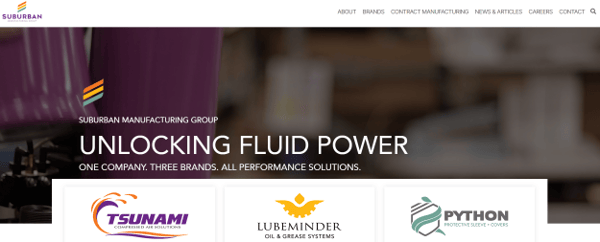
Simple, attractive, and easy. The main navigation is still accessible at the top, and the search button is where you expect it to be in the top-right. Scrolling past the banner gives access to more info and clickable elements.
A note on visual layout:
One study asked internet users to describe what makes them mistrustful of a website. The results: 94% of comments were directly related to web design elements, while only 6% referenced specific content. In today's society, that's about as unanimous as you'll see.

Many, many studies have been conducted on how humans digest online information. We all seem to follow a particular "F"-shaped reading pattern. That means we scan from left to right and then from top to bottom. Keep this in mind when deciding what information should be included on the page and where.
Menus
Making information accessible is always a primary goal in B2B website design. However, today’s websites can have different approaches to accessible content, based on the way your users prefer to interact and also the amount of information you’re providing. Here are the five most common menus that provide access to the rest of your website (and some examples):

Classic: Typically a horizontal bar at the top of every page on the site, this includes links to the key sections and pages of the site.
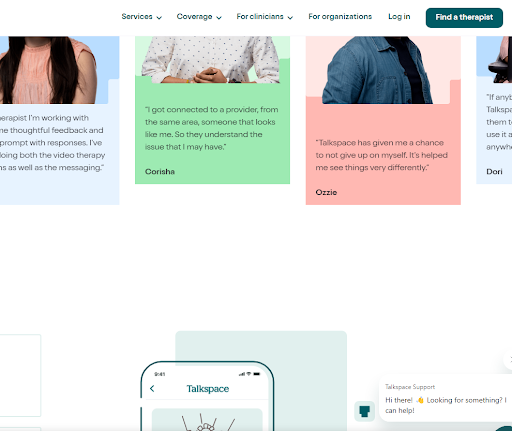
Sticky: This menu is also sometimes called a floating menu and follows the user as they scroll the page, providing access to other pages at any point (a popular option if you have a lot of content on your page and it’s a long scrolling process. This eliminates the need for a “Back to Top” button).
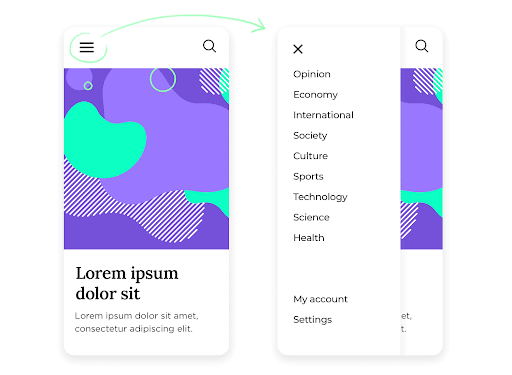
Hamburger: Named for the appearance of its icon, this staple of mobile design shows as three horizontal lines when minimized. When a user clicks the “burger,” a full menu of options appears.
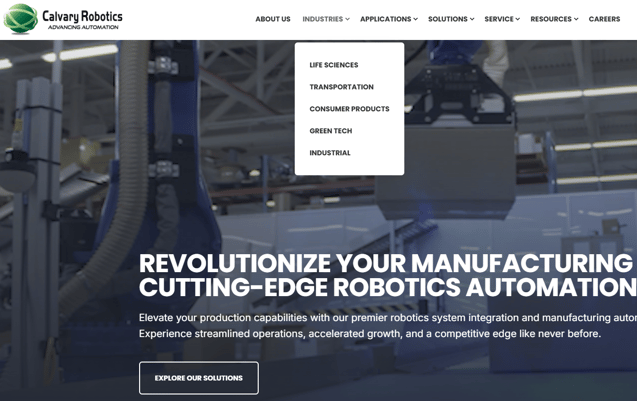
Dropdown: Similar to the hamburger, this menu starts off minimized. The difference is that a dropdown’s first option is already visible, making it an easier UX (at least on desktop). And unlike a classic menu option, a dropdown menu includes an arrow to indicate it’s expandable for more subcategories.
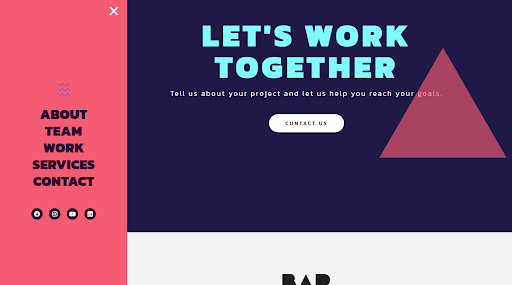
Sidebar: This menu provides options to the left or right of the main content of the page. Occasionally, sites in aesthetics-heavy industries (i.e. furniture design) use this style to keep the focus on the imagery. Sites with unavoidably large menus may also employ this style to allow more space for navigation without overwhelming the site’s key real estate.
CTAs
Every page needs purpose. Otherwise, you’re creating a bunch of digital dead-ends.
Did you know that adding a CTA to the bottom of a page can increase conversions by over 300%? It worked for Michael Aagaard, a conversion optimization consultant. Calls-to-action (CTAs) change your content from passive information sharing to a chance to build your contact database.
To make this happen, map out the goal of each webpage. Give them each a CTA (or multiple CTAs) most likely to be relevant to the visitor’s current stage in their buyer’s journey. In other words, sprinkle in a variety of value-adds – don’t just spam “REQUEST QUOTE NOW” buttons everywhere. That’s tacky, and it doesn’t help searchers who might be in Month 2 of an 18-month sales cycle.
|
Page Type |
Primary Goal |
Possible CTAs |
|
Homepage |
Introduce what your company does for buyers |
👉 Contact Us |
|
Products/ Services |
Explain specs, scope, and benefits |
👉 Request a quote |
|
About Us |
Build trust and credibility |
👉 Contact Us |
|
Resource Pages |
Educate & engage readers with blog posts, guides, FAQs, etc. |
👉 E-book landing page |
|
Contact Us |
Invite questions or quote requests |
👉 Contact form |
|
Case Studies |
Show-don’t-tell proof of your awesomeness |
👉 Downloadable version |
Here’s another stat to tuck away: Adding more whitespace around a CTA can increase conversions by 232%. Small changes matter with CTAs!
Links
Similar to CTAs, links provide users the chance to gather more information and choose to continue their buyer’s journey. Again, you’re trying to spin webs here, not dead-ends.
As you’re air-dropping links into your text, remember that links should be …
- Relevant, adding context and expanded information on the current page’s topic
- Clear, with text in a contrasting color and setting clear expectations of where you’re taking the user
- In moderation, with enough links to be helpful, but not so many that they make the copy distracting or choppy

1B – Branding
There’s an old saying that B2Cs sell to people, and B2Bs sell to companies. That’s nonsense.
Yes, your visual style and tone of communication should reflect authority and professionalism. But you know who works at those companies to which you’re selling?
Humans.
Your next website build needs to strike the right balance between:
|
Simple |
⇔ |
Splashy |
|
Conversational |
⇔ |
Professional |
|
Helping |
⇔ |
Selling |
What are your ideal buyer’s preferences and personalities? This is the stuff you should have learned – and be continually learning – from every sales presentation, support call, and customer survey.
Visual Branding … and When to Stop
At all times, you want visitors to know they’re on your website, regardless of what page they land on. That means keeping uniform brand colors and fonts, and even general layout. By creating a consistent experience, you’ll free visitors to move about the site briskly without having to stop and think about it.
Take your digital brand identity up a notch with:
- Color psychology: Study the way different hues evoke different feelings – like how people associate blue with trust and tranquility, and green represents growth and the environment. Use colors that help buyers quickly recognize what market you’re in, but try to stand out from competitors at least a little.
- Images that fit your aesthetic & values: Source high-quality images that’ll resonate with your audience, avoiding cheesy stock photos whenever possible. If you choose to stand out with a specific style or filter, use it consistently so your site retains cohesiveness.
- Easy-to-identify font: Select a unique and readable font set, and use it across all communications to reinforce your brand’s character.
- Iconography that fits your niche: Using visual symbols that relate to your buyers’ needs can help convey information in a more skimmable, impactful way.
(p80 Tip: Make sure these elements are visible on both standard and dark backgrounds, as many buyers use Dark Mode on their devices.)
|
Bells & Whistles Can’t Compensate for CrappyThere’s value in creating “About Us” videos and animated homepage banners. But don’t go overboard with visual pizzazz can’t come at the expense of Commissioning 20 hours of professional video or nitpicking every homepage design element takes time from more important tasks, like honing the site’s message and SEO. |
Messaging
If someone lands on your website, can they understand your unique selling points in the first 5 seconds? If not, your B2B website strategy has failed in its messaging.
Messaging = the language a company uses to explain why it's valuable and special to buyers. Keep yours straightforward and easy to understand. Trying too hard to sound smart or techy can confuse or alienate readers.
Here’s what you shouldn’t do …

… and here’s what you should do:

Ask yourself, “What are my customers looking for?” and frame your marketing message around the answers. While it might seem logical to load each page with all the reasons they should buy NOW, that’s going to chase away visitors who aren’t ready yet.
1C – Content
Here we are: the biggest hangup B2B leaders have with digital marketing.
We’ll state it plainly: You’re not the star of your own show.
Creating content for your website is more than just saying what you sell and why you’re amazing. You also need to show potential customers that you understand what they are looking for and how a solution might impact their future. This comes back to the concept of helping vs. selling – the purpose of content marketing is to make the buyer a hero, not present yourself as one.
So, yes, share company information that makes sense. Details on your facilities, for example, could showcase that you’ve got the bandwidth and equipment to finish projects on time. Certifications and memberships show you’re connected in the industry.
But in this era of B2B buyer self-education, you’ll need more.
Educational Content
B2B content marketing consists of value-adding assets like:
|
Format |
Content Examples |
|
Blog Posts |
▪️How Automation Cuts Prototyping Costs |
|
FAQ Page |
▪️What materials can you work with? |
|
Download |
▪️E-book |
|
Interactive Tools |
▪️Price calculator |
|
Customer Portal |
▪️Resource center |
While you’re creating the content, think about how you would talk to the reader if you were in the same room. Keep it conversational and valuable to them, rather than overly stuffy and sales-y. Coming across as greedy or desperate will push the visitor right off your site and back to Google Search.
In fact, Google has E-E-A-T guidelines that reflect how its algorithm ranks webpages in search results:
- Experience – demonstrated firsthand knowledge (i.e. you’ve actually used the product you’re reviewing)
- Expertise – accurate and deep content with author credentials & cited sources
- Authoritativeness – you’re a go-to source that others reference on their own pages
- Trustworthiness – honest, up-to-date, and secure
In short: Content needs to help the reader solve a problem.
(Related Resource: The Best B2B Blog Examples for 2026)
Video
Remember, your B2B is still selling to humans. Putting your people and your facility on camera adds a personal touch and shows your offerings in a way words can’t.
There are three videos every B2B website should have:
- About Us – the core of the company, its culture, and its “why”
- Facility tour – shows off your capabilities & technology
- Demo – seeing your product/service in action turns buyers into believers
Promotional videos (and educational ones, too!) can transform your B2B from a generic impression to a fleshed-out, humanistic entity.
(p80 tip: Worried that filming isn’t in your budget? Not every video needs to be Hollywood-quality. It depends on the use case, and in some cases something is better than nothing. Unless your footage is “Blair Witch” levels of bad.)
Social Proof
Buyers trust the people they know. They also prefer to hear about your satisfied customers from … actual satisfied customers.
With this in mind, having testimonials and case studies available on your website provides information in a reliable format. It’s the closest facsimile you can create to word-of-mouth referrals from friends.
In situations where you don’t have a non-disclosure agreement in place, using real names and faces adds credibility to the kind words. “Mike Graham, Acme Aerodynamics” sounds more legit than “M.G., satisfied buyer.”
(Related Resource: Your B2B Prospects Are Judging Your Website)
1D – SEO
SEO = search engine optimization. SEO is the process of maximizing the way Google reads your site and the way you present information so users can find it using specific keywords.
An SEO-friendly website is the difference between drawing in great-fit leads and getting lost in Google’s endless shuffle of search results.
Keywords
Your first instinct is probably to use your product/service name as a keyword all over the site. This works well in places, but if you’re only shooting for branded keywords and ignoring more general, problem-focused keywords, your website won’t reach max visibility.
|
Journey Stage |
How Specific? |
Keyword Examples |
Where to Use |
|
Awareness |
Broad |
◾Machining stainless steel |
Overview-style blog post, FAQ, video |
|
Consideration (Mid-Funnel) |
Moderate |
◾Machining vs. stamping |
Comparison content, whitepaper, how-to guide |
|
Decision |
Specific |
◾Metal part manufacturer |
Product/service page, case study, contact page |
Someone in the early stages of problem solving won’t know about your part, your business, or that you even offer the service they need. That’s why keywords that focus on the searcher's problem are key to a balanced approach to ranking online. No need to propose on the first date, Romeo.
So, how do you actually select these keywords? The three big criteria, in order of importance, are:
- Search intent: Transactional keywords are great for those who are in the late stages of the funnel. However, you want your website to reach all stages of the funnel. Therefore, self-education keywords and pages should be a big part of your website content.
- Keyword difficulty: The broader and more saturated your market is, the harder it’ll be to rank for keywords in general. (Think trying to outrank Nike and New Balance for “running shoes.” Choose keywords that give you a fair chance at competing for top search results. Use a tool like SEMrush or SE Ranking for this.
- Search volume: You may go googly-eyed when your SEO tool tells you a desirable keyword has 2,000 searchers per month. However, the more focused the page is (i.e. a blog post) and the more niche your service, the narrower your search volumes your keywords will and should be. Don’t get mesmerized by towering search volumes.
(For a deeper dive: Free Download: 7 Ways to Master Keyword Research for SEO)
On-Page SEO vs. Off-Page SEO
Healthy B2B website development means paying attention to SEO factors both on and off your website.
|
|
On-Page SEO |
|
🔗 Linking |
Helps Google crawl your site, reinforces topical relevance, keeps users on-site longer |
|
🎓 Site Content |
High-quality, user-focused, keyword-friendly content signals value to search engines |
|
🔖 Headers |
Provide structure (like sections and chapters in books), highlight keywords naturally |
|
✏️ Meta Description |
Summarizes the page content in search results, influencing click rates |
|
🌐 URL |
Clean, keyword-rich URLs improve user readability & search engine understanding |
|
🖼️ Alt Text |
Describes images for accessibility; helps search engines grasp visual content |
|
|
Off-Page SEO |
|
🪜 Link building |
Earning backlinks from reputable sites signals authority and trust to search engines |
|
📢 Social media |
Shares and engagement drive traffic & potential backlinks |
|
🤝 Guest blogging |
Publishing on industry sites (and vice-versa) builds authority, reach, & backlink quality |
|
🤖 AI Engines |
Optimizing content for ChatGPT, Google’s AI Overviews, etc. makes pages more findable |
Search engines weigh many factors when determining a page's ranking. While some of the factors are based on website content and performance, Google also gathers its understanding of your website through sources outside of your domain. That's why off-page SEO is so valuable. Google looks at a page’s backlinks (links on other pages that refer to your site) for both quality and quantity.
This is why link building is so important to your SEO strategy. Trustworthiness and authority come both from how you present your content on-page and how others show they respect and rely on your content.
For more on these topics, check out more content in our Resource Library:
- Why You Shouldn’t Ignore On-Page & Technical SEO
- Common Website Technical SEO Issues, and How to Squash Them
- Off-Page SEO: What It Is & Why You Need It [+a Helpful Checklist]
- B2B SEO Audit Checklist -- Interactive PDF Included
1E – Technical UX-cellence
Even the most Hollywood-ready website and crisply written content won’t perform well if using the site feels clunky or shady. Technical user experience (UX) is about the behind-the-scenes elements that make your site fast, safe, and usable for all.
🔒 Security
If visitors see a “Not Secure” warning in their browser, they’ll likely skedaddle before they ever read a word. Here are a few core terms to know:
- TLS/SSL certificates: These ensure that data traveling between your server and the user’s browser is encrypted. Make sure TLS/SSL is set up correctly across all versions of your domain (www., non-www., and any subdomains).
- HTTP vs. HTTPS: Browsers use two protocols to load web pages: HTTP (older, unencrypted) and HTTPS (secure, encrypted). HTTPS protects data traveling between your site and the visitor’s browser – and Google now expects all business websites to use it.
Mixed content issues (when secure and non-secure content load on the same page) can break HTTPS and cause browser warnings. Tools like whynopadlock.com can help you catch and fix these.
Beyond trust, HTTPS is also a Google ranking factor — so skipping it hurts both UX and SEO.
(For a deeper dive: Website Migration Checklist: 5 Steps for a Smooth Transition)
📱 Mobile Matters, Even in B2B
In a world where nearly everyone has a mobile device in their pocket at all times, optimizing your website for mobile traffic is a no-brainer. While mobile use is more common on the B2C side, it still makes up 20-35% of B2B traffic.
If that doesn’t put pep in your step, this will: When evaluating a page’s quality, Google prioritizes the mobile version.
Ensuring your website is optimized for mobile means more than simply making a few aesthetic tweaks. A site’s mobile version should build a customer journey that’s responsively designed, relevant, actionable, and frictionless.
Some quick best practices:
- Place buttons & menus far enough apart to avoid “fat finger” mistakes
- Use fonts & images that display cleanly on smaller devices
- Ensure all media formats are mobile-compatible
Web design with clunky menus, small buttons, and desktop-only formatting creates a terrible user experience for mobile viewers. However, it’s never been easier to make your website mobile-friendly, so there’s no excuse for having your website display poorly on a visitor’s smartphone.
Test your website on a smartphone or tablet before launching it. Doing so helps your mobile experience look like a priority rather than an afterthought.
(For a deeper dive: SEO & UX Checklist: Optimizing a Website for User Experience)
♿ Accessibility
Accessibility isn’t optional – it’s a responsibility. Your site should be usable for people with visual, auditory, or mobility challenges. There’s something in it for you, too: Many accessibility improvements also boost SEO.
Core accessibility considerations:
- Provide descriptive alt text for images
- Maintain strong color contrast between text and backgrounds
- Use heading structures (H1, H2, H3) logically
- Ensure keyboard-only users can navigate your site
- Test with accessibility tools like Accessibe
Not only does this expand your audience, it also signals professionalism and compliance with regulations (like ADA or WCAG).
(For a deeper dive: Website Accessibility Checklist)
Other Technical UX Factors
You may also want to address these in your technical UX audit:
- Page speed: Fast load times keep users from leaving. Image sizes and overly flashy designs are common culprits on slow sites.
- Browser compatibility: Make sure your site looks and works properly on Chrome, Safari, & Edge.
- Error handling: Custom 404 pages can guide lost visitors to other places on the website instead of losing them.
- Analytics & tracking: Properly installed tools (Google Analytics, HubSpot tracking) ensure you can measure and improve UX over time.
PART 2: Anatomy of a Website Build (or Rebuild) Project


1. Set Ground Rules
Goals: Decide whether your project is a facelift, a platform transfer, or a full redesign. Then get all stakeholders aligned on what the site should accomplish and how it supports broader business goals.
Roles: Define responsibilities early — and clearly. Key questions include:
- Who will communicate between stakeholders and the project team?
- Who will supply assets (photos, offline content, logins)?
- Who will review work, and who will have final say?
- Who will handle DNS and launch details?
Choose the right people, in-house or outsourced, and hold them accountable.
Budget: Once the scope is clear, set a realistic budget and timeline. Factors include:
|
Cost Factor |
What It Is |
$$$ Impact |
|
Website size |
Number of pages, from product pages to educational resources |
💸💸 |
|
Content/media |
What exists, what needs written, and what media needs created |
💸💸💸 |
|
Technical needs |
Features like calculators or chatbots add time and cost |
💸💸💸 |
|
Launch speed |
Bigger team can finish faster, but might have to pay “expediting fee” |
💸 |
(For a deeper dive: Average Cost of a Website Redesign)
2. Audit the Landscape
Before you break ground on building (or rebuilding) a website, get the lay of the land. Knowing the state of your company, your competitors, and your target buyers ensures you’re not starting blind.
Audit Your Existing Website
If your company already has a site, take time to evaluate it objectively. Look at:
- Marketing & sales metrics: How much traffic are you getting? Where is it coming from? Which pages drive the most leads or conversions? Are there gaps between marketing-generated leads and sales-ready opportunities?
- Technical performance: Is the site fast and mobile-friendly? Page speed and responsiveness directly impact user experience — and Google rankings.
- SEO health: Are you ranking for the keywords your buyers are actually searching? Are there broken links, duplicate content, or missing metadata?
- Content library: What resources do you already have (blogs, case studies, white papers, videos)? Which pieces are still relevant, and which need updating or retiring?
This review gives you a baseline for what’s working, what’s underperforming, and needs a new vision.
Audit Your Competitors
You’re not the only game in town. Buyers are also evaluating your rivals’ sites. Explore competing websites and take note of:
- Messaging: Are they emphasizing price, expertise, innovation, or speed? Are they using keywords that are missing on your site?
- Content: Do they offer blogs, calculators, video demos, or gated resources that engage buyers?
- UX: How intuitive is their navigation? Is it easy to understand their offerings quickly? Are they using modern visuals and layouts that feel current?
By understanding competitor strengths and weaknesses, you can identify opportunities to differentiate your own site.
Audit Your SEO & Keywords
Your website can yell all it wants about how great your service is, but it doesn’t matter if you’re speaking the wrong language.
You’ll need to research and dig up the Google search terms best suited for attracting your ideal buyer. At a 10,000 ft. view, keyword research looks like this:
- Find relevant search terms: Focus on the specific language your buyers use when researching solutions. For B2Bs, these often include technical terms, industry phrases, and problem-based searches (e.g., “hydraulic press maintenance” or “ERP software for manufacturers”).
- Weight volume vs. difficulty: Low-traffic keywords are OK to use if they’re hyper-relevant to your business. They’re better than vague, high-traffic terms you’ll never realistic rank for.
- Map keywords to the buyer’s journey: Target not just high-level awareness keywords, but also more specific “consideration” and “decision” terms that align with your sales funnel.
3. Gather Assets
Don’t underestimate the power this step has to trip you up. It's a real stumbling point for companies that don’t set their web and marketing teams up for success.
Make sure the appropriate people have all the assets and permissions they need to do their jobs:
- DNS – You’ll need access to point your domain to the new site at launch
- Domain registration – Confirm it’s active, renewed, and registered under the right ownership
- Logins – For hosting, CMS (content management system), analytics, & other connected platforms
- Visual assets – Up-to-date logos, product photos, & videos … or set a plan for creating new ones
- Copy assets/expertise – Existing content, and the time of any subject-matter experts you’ll need to inform new content
Organize all of these assets in a central folder so there’s no confusion or duplicate versions floating around.
4. Map Out the New Website
Whether this is version 1 or version 152, start fresh with a new sitemap, aka the “blueprint” of your site. Think of it as a flow chart showing every page and how they connect.
When deciding what to pages include at launch, look at:
- Your data – Use traffic and lead metrics to see which pages earn the most engagement
- Similar websites – Study competitors and peers for common features or page hierarchy.
- Pain points – Add pages that address buyer needs, like resource hubs or FAQs
Navigating a Good Website Layout
Your sitemap should guide a simple, intuitive navigation bar with clear labels for core pages. From there, use dropdowns for industries, services, or product categories so visitors can quickly find their path.
If you’re striving for a speedy launch of a minimum viable product (MVP), focus on these key pages:
|
Page Type |
Purpose |
|
Homepage |
Acts as a front door – quickly explains who you are and where to go next |
|
Product/ Service |
Show what you offer, with links to more specific subpages |
|
About Us |
Builds trust by highlighting your story, people, & values |
|
Resources |
Directs buyers to educational content (blog posts, videos, case studies, etc.) |
|
Contact Us |
Gives visitors an easy way to take the next step |
Start here, then expand with supporting pages (Case Studies, Industries, Careers, etc.) as you have more bandwidth and your company grows.
5. Pick a Visual Theme
The first rule of website redesign: Make sure all stakeholders are aligned on look and functionality before you finish a draft. Before you even start a draft would be better. There’s nothing less efficient than redoing the entire homepage because the CEO and COO have totally different aesthetic preferences.
We can’t stress it enough: During this template rebuild phase, make sure you and other stakeholders are aligned on:
- Colors
- Images
- Videos
- Design/layout preferences
The designer will need “do this” and “don’t do this” references and examples up-front, plus any new assets (i.e. logos and brand color hex codes) you want on the site. Drip-feeding this required material upon request is inefficient and irritating for the designer.
Start with off-the-shelf templates for efficiency and consistency, unless you truly need special functionality. A master template makes it easier to visualize layouts across multiple pages, and tools like Figma can help you map designs before development. Custom templates can set you back $3,000 or more.
No matter the template you choose, it should have these core tenets:
✅ Mobile-friendly
🎨 Consistent color palette & typography
🧭 Simple & intuitive navigation
🖼️ High-quality images, at least some of which are proprietary
⏱️ Loads quickly
Draw inspiration from other B2B websites and involve both web and graphic designers to create a user-friendly, trustworthy look. Once the framework is in place, add media assets to polish the site — but remember, clear messaging matters more than flashy visuals.
(For a deeper dive: What Makes a Well-Designed Website? | Industrial Examples)
6. Build it
Time to put it all together.
It’s nice to have a striking visual layout, but Google can’t rank you based on pretty pictures. Devote time and expertise to creating buyer-focused, SEO-ready content for your B2B website.
Site Infrastructure
To increase your odds of reaching buyers, identify a primary keyword for each page you build. This should be the term you want that page to rank #1 for in Google Search. Generally speaking, every page should have a different primary keyword.
Let’s also talk about SEO tags. Each page needs:
|
Tag Type |
Function |
|
Page/ |
Linked title in search results; should attract attention and include key terms |
|
Meta description |
Should clearly state what page contains & the value it'll provide user |
|
H1 header |
The page’s headline; should include main keyword |
|
H2 headers |
Should read like book chapters. At least one should include main keyword |
|
Alt text |
Should plainly state the image’s contents and main keyword |
That’s the skeleton. Now you transplant the beating heart into the page – your team’s masterful writing!
Written Copy
Assign written copy – not too short, not too long – to the appropriate page. B2B website copywriting is a whole other animal compared to old-school copywriting, but here are some basic tips:
- Make your customer – not you – the hero of the story.
- Show, don’t tell.
- Include links to related pages, creating an interconnected "web" that keeps users engaging with your site longer.
- This segment of the build typically takes the most time and collaboration. The fewer people invited to review the work, the better.
- Don’t propose marriage on the first date – not every page needs a huge, gaudy “REQUEST QUOTE” button.
7. Prepare for Takeoff
After your merry marketers create and edit the content, and the pages look ready for viewing by your target audience, it’s time to evaluate.
Testing
Consider a soft launch to staff and stakeholders only. This way you can tidy up any major “oopses” before the world sees them.
This doesn’t excuse you from testing yourself. To win over a user, think like a user. Navigate through the website as your target buyer might. You can even ask people outside the office to be your guinea pigs.
If the experience goes well, move on to making sure it works well:
- Use a site-performance tool to verify there are no broken links.
- Test the submission forms and make sure submission alerts are going to the right salesperson.
- Test any unique or complex modules (i.e. a pricing calculator) to make sure they put out accurate responses.
Launch!
It’s time to launch to the public and your (hopefully) future customers!
If the site is ready to go live, you can now adjust DNS settings as necessary. This behind-the-scenes work takes time and care. Not everyone has a grasp of how this works (even your IT guy), so bringing in an expert to transition the website is nothing to be embarrassed about.
Once the settings are complete, the domain can take hours to begin showing the new site.
Make a final sweep of all text and functional elements. Separate any problems the team finds two buckets: major issues that need a fix before launch, and non-critical issues you can address afterward.
Launch the site earlier in the week. If you launch at 2 p.m. Friday and the site breaks an hour after everyone leaves for the weekend, you’re gonna have a bad Monday. Above all else, have a rollback plan ready in case the migration causes an unforeseen major issue.
Watch Your Performance
Keep a close eye on your website’s analytics to ensure you didn’t miss a step during launch. Short-term dips in traffic are common after a migration, but if you see a major drop, it’s time to self-scout.
Sometimes, third-party software can locate problems you’d never have the time to constantly check up on. SEMrush and other site auditors can continue cleaning up messes post-launch.
In all the madness of launching a new website location, don’t forget your ads!. If you have ads or anything else that uses old URLs, return to them and add fresh links.
Congrats! You’re ready to start digital marketing the modern way!