

The internet is full of B2B websites. Some are impressive, showing attention to detail and frequent creative updates. Some have pages that promise new content but haven’t been updated in years. Some present futuristic, while others date back to 15 B.C. and are horrendously slow to load. And some websites aren’t even optimized for mobile devices in 2026.
If your website identifies on the negative side of this list – or if you’ve identified other issues that require a total site overhaul, it’s time to learn how to make a better B2B website. No matter if you’re starting from scratch or redesigning an existing site – this guide is for you.
Before We Dive In: How’s Your B2B Website Strategy Looking?
The first step to (re)launching a website is to develop a website creation strategy. This way, you can be armed and ready with:
- Brand guidelines
- Market, competitor, & keyword research
- A general idea of who will do the work
Once you set the criteria for your website and brand, you can start building your big idea. This step will set the standards for the entirety of the project. This way, there will be fewer questions about simple decisions like what font size or colors to use.
The B2B Website in 9-Step Process
While there’s no exact roadmap on how to build a B2B website, we broke down the key steps below. Use these nine points as milestones in the project process:
- Determine goals & scope
- Assign roles
- Create a sitemap
- Design
- Write
- Evaluate performance & SEO
- Test links, pages, etc., and address issues
- Launch (but don’t leave for vacation)
- Complete post-launch punch list
1. Determine Project Goals & Scope
Some projects are facelifts; others are total overhauls. Is your website project simply a transfer from platform to platform? Or is it a complete redesign? Does it land somewhere in between the two?
All stakeholders must agree on what you hope to accomplish with the build. How will it tie into your big-picture business goals? The new website should help you get closer to meeting those goals.
Once everyone’s aligned, set a budget and timeline for the web build so costs don’t become a runaway train. To do that, put the exact scope of the project in writing. Scoping factors include:
- Site size: Estimate the number of pages you’ll need before launch. This means considering everything from landing pages to the privacy policy to a custom 404 error page.
- Content/media: Audit whether any SEO-ready written content exists and is ready to be air-dropped into a new design. If not, your copywriting team will need to gather product/service knowledge and write the content. Likewise, see what your company has for media assets. If you don’t have anything high-quality and recent, you’ll have to develop a plan for either capturing images/videos or seeking them elsewhere.
- Website technical level: Will your site include fancy features like price calculators or sophisticated chatbots? Those take time, money, and expertise, as development and testing are not a one-day process.
- Launch: How fast do you want the site complete? You’ll need a team big enough to accommodate your deadline, but you also want to make sure your deadline is realistic. Remember, it’s not a rule that every nonessential page must be complete before you launch the site. You can save website development costs (for now) by preparing an MVP – “minimally viable product” – for launch, with the expectation of adding more features later.
(Note: All sites require some maintenance regularly post-launch, even if you don’t add new content.)

2. Assign Roles
Divvying up project responsibilities is deceptively tricky, especially if you wait too long. Consider these important roles and potential roadblocks:
- Who will be the main liaison between stakeholders and those doing the actual work?
- Who will provide hard assets (like product photos) and soft assets (like product knowledge)?
- Who will provide logins for all necessary tools and platforms?
- Who will review the work – and, if multiple people, who has final say?
- Who will handle DNS changes for the site?
Some areas of the development process are complex and must be done carefully. Assign your responsibilities wisely, whether that be in-house or outsourced. Hold them accountable.
3. Sitemap
Whether this is v1, v2, or v152 of your website, lay out a sitemap from scratch.
A sitemap is the "blueprint" that lists all pages on your site, and how they connect to one another. If it manifested itself in physical form right before your very eyes, it’d look like a flow chart or family tree.
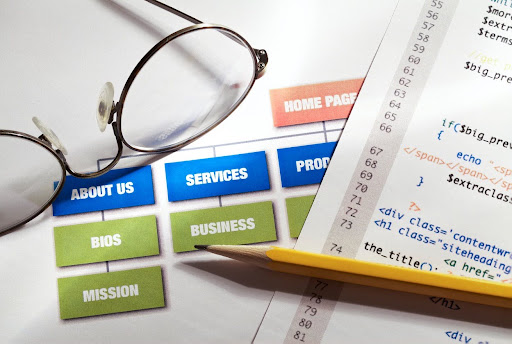
A more tangible comparison is the main navigation bar you see atop most websites. However, your sitemap should go deeper than that menu and include all pages you want for launch.
Now, how do you decide what pages to prioritize including?
- Your data: A website that’s up for any length of time will receive feedback, even if it’s indirectly in the form of traffic and lead metrics. If you have existing data, see where users are spending the most time.
- Similar websites: Whether they belong to archnemeses or peers you admire, other successful sites in your industry can clue you in to what matters. Look for recurring features, pages, and categorization methods.
- Pain points: It *pains* us to say it, but many B2Bs are good-hearted but forget to show that in their digital marketing. Prioritize any pages that might solve pain points for your buyer persona – i.e., a hub of helpful engineering resources.
Navigating a Good Website Layout
Naturally, a finished map will help inform your website’s main navigation bar, as well as any secondary menus.
The best B2B website designs are simple, yet direct. Create menus that give users a logical direction to find the information they seek.
The main navigation should have obvious (or at least intriguing) labels identifying the top, core pages. From there, the dropdown columns should include a list of your main industries, product categories, services, or whatever’s relevant to that “vertical slice” of the site.
4. Design
|
How to Create a B2B Website That’s ScalableYou might offer a satisfactory website user experience (UX) today, but what works now might not in 3 years. Time will pass, and web users’ expectations will evolve. As you choose a website host, theme, and templates, keep scalability in mind. Your CMS (content management system) should provide the opportunity to scale your site alongside your business as it grows. Think of features that might not be doable now (i.e., payment processing), but you might want to add later – if your platform can handle it. |
Choosing a platform has a big influence on the design process. If you choose to work with HubSpot CMS, there are benefits (the novice-friendly editors) and drawbacks (the sticker costs). Likewise, if you choose WordPress, there will be benefits and downsides (like having to add several plugins to reach full functionality).
Design work also includes choosing a theme. Remember that it's best to work with off-the-shelf templates to avoid wasting time troubleshooting or starting from scratch. A master template also makes it easier to visualize the design of several different pages at once, rather than having to come up with a layout for each page separately.
When starting a B2B website from scratch, you may appreciate a collaborative design tool like Figma for laying out the bigger design elements. Having a visual representation can make getting approval easier, and from there it’s not a big jump to implementation.
There’s nothing wrong with getting inspiration from external sources. If visual design isn’t one of your strengths, lean on experienced web designers or take a look at other B2B website examples. If you have a graphic designer on staff, they can collaborate with the web designer to brainstorm the most user-friendly way to showcase your products and services.
Next, drop in media assets to give the pages curb appeal. Your site should look polished and trustworthy, but don’t spend too much time on snazzy videos and collages – it’s the message that matters most. Make sure to review the formatting on both desktop and mobile.
5. Write & Build
|
Start at the Top? Not NecessarilyOnce you have a template in mind and the core design elements, it’s time to start adding content and images. Start with an important page, but not the homepage. This provides a better segue into structuring the pages and can set the stage for a cohesive site theme. Your homepage is your virtual storefront, and as such it can bog down the whole project if you fret over perfecting it at the get-go. Working on pages with a specific focus, like “Services/Capabilities” pages, can get momentum rolling more quickly. After that, you’ll already have most of the info and style cues you need for the homepage. |
UX and organization apply to individual pages and their text as well. There are pieces you must put in place before you build and publish a website.
Remember that small detail about needing “SEO-ready content” for your B2B website strategy? It’s actually a major detail, from your product descriptions down to the “tags” Google’s search crawlers use to understand each page’s hierarchy and flow.
To increase your odds of reaching buyers, identify a primary keyword for each page you build. This should be the term you want that page to rank #1 for in Google Search (and help you gain visibility in AI searches). Every page should have a different primary keyword, except in rare cases. There are several tools available that will identify relevant opportunities for your content.
As for SEO tags, each page needs:
|
Location |
Tag Type |
Function |
|
Off-page |
Page/SEO title |
Hyperlinked title that appears in search results; should attract attention and include the keyword to some extent |
|
Off-page |
Meta description |
Promotional blurb below page title; should clearly state what the page contains & the value it'll provide the user |
|
On-page |
H1 |
The page’s headline; should include the main keyword |
|
On-page |
H2 |
Like book chapters -- makes copy more organized and scannable. At least one should include the main keyword |
|
On-page |
Alt |
Appears in place of images when pages are loading slowly, or a user has vision impairment. Should plainly state what’s in the image and include the main keyword |
|
On-page |
Body text |
Both primary and secondary keywords should be tastefully scattered throughout the content to avoid overuse, but still provide value and SEO attention |
That’s the skeleton. Now you transplant the beating heart into the page – your team’s masterful writing!
Assign written copy – not too short, not too long to the appropriate page. While 1,000 words may be the guide for a blog post, this length would be too long for a contact page or a careers page. Moral of the story: use your best judgment. B2B website copywriting is a whole other animal, but here are some basic tips:
- Make your customer – not you – the hero of your story
- Show, don’t tell
- Include links to related pages, creating an interconnected "web" that keeps users engaging with your site longer
- Proactively address buyer objections
- Account for multiple stakeholders
- Write with conversion intent
This segment of the build typically takes the most time and collaboration. The fewer people invited to review the work, the better. (Trust us; it gets messy and lacks efficiency.)
How to Get Leads From Website Pages: CTAs
The cherry on top – or, in this case, usually the bottom – is the call-to-action (CTA).
A CTA is a graphic, button, or text link that encourages the visitor to do something. Visit another page, schedule a demo, or contact you for a quote. These actions can be the tipping point between a curious onlooker versus a closed customer. Without CTAs on your website pages, how will you collect new email contacts to nurture?
Build CTAs targeted to different stages of the marketing funnel. Not everyone is going to head to your Contact Us page on their first visit. However, if you successfully nudge someone to fill out a form to subscribe to your newsletter or download a whitepaper, you’ve successfully influenced their process. Now your brand is lodged in the back of their mind.
6. Evaluate Performance & The -EOs
Content is created and edited, and the pages seem to be finalized and ready for viewing by your target audience. Now is the time to evaluate and make sure the SEO, AEO, and GEO are up to standards. Utilizing both search and AI-powered keywords will take your search results to the next level. So, you want to ask the questions:
- Do all the pages have a primary keyword you want them to rank for in Google, with secondary keywords mixed in?
- Is there a custom meta description for each page to entice users to click on your Google search result?
- Are the page titles and URLs clear, relevant, and keyword-inclusive?
This final review may turn up opportunities to include keywords on a page that doesn’t have them, or to beef up a keyword that was mentioned but not fully optimized.
7. Testing, Testing!
To win over a user, think like a user. Navigate through the website as your target buyer might; or ask some people outside the office to be your experimental guinea pigs.
If the experience goes well, move on to making sure it works well:
- Use a site-performance tool to verify that there are no broken links.
- Test the submission forms. Figure out who should be getting the notifications that a form was submitted so they can begin tracking or nurturing the lead.
- Test any unique or complex modules (i.e., a pricing calculator) to make sure they put out accurate responses.
8. Launch (No, You Can’t Leave for Hawaii Yet)
If the site is ready to go live, you can adjust DNS settings as necessary. This behind-the-scenes work takes time and care. Not everyone has a grasp of how this works, so bringing in an expert to handle this aspect of the website transition is nothing to be embarrassed about.
Once the settings are complete, the domain can take hours to begin showing the new site, as Google has its own timeline for the process.
Make a final sweep of all text and functional elements. Separate any problems the team finds into two buckets: major issues that need a fix before launch, and non-critical issues you can address afterward.
Launch the site earlier in the week. If you launch at 2 p.m. Friday and the site breaks an hour after everyone leaves for the weekend, you’re setting your next week (and website) up for failure.
9. Complete Post-Launch List
You’ve launched a site, congrats! While you may think you can breathe that sigh of relief, you’re not quite done yet. Any site will have a few tweaks to make after launch.
Some elements that worked correctly in draft mode might look or act wonky on the published version. Or, you might get feedback from someone that gives you a new idea for a service or resource page. Either way, there is bound to be a new list of (hopefully minor) changes to make before you can consider the site complete.
A post-launch honey-do list is a great way to gather feedback and prioritize potential improvements.
B2B Websites: Easy As 1, 2, 3
Learning how to design and curate a B2B website takes time and effort. The investment will be worth it.
Start by seeking clarity on how the website will tie into your business goals. From outlining the scope to making sure your messaging resonates with the right people, you truly need to start “from the ground up.”
Applying the above steps will ensure the Google algorithm doesn’t leave your website in the dust, while boosting the human experience as well!
If you want a deeper dive into improving your B2B website, download our SEO and user experience website checklist:

How to Audit your Online Marketing
If you are executing digital marketing, congratulations! You are most likely already one step ahead of your competition, and making strides to meaningfully connect with prospects online. But, how do you know if you’re seeing continual success year over year, and improving your metrics?
Without the tools in place to analyze and benchmark your efforts, it is impossible to scale your online marketing and ensure continuous success.